
Video in Email Marketing: How to Plan Video That Actually Gets Clicked in the Inbox

Adding video to email is one of the most reliable ways to lift click-through rates, but only if the video is planned for the inbox rather than bolted on afterwards. Most brand videos we see in EDMs were made for a website or social feed, then squeezed into an email with a generic thumbnail.

After more than 18 years producing brand, corporate and explainer video in Sydney, we have learned that the best email video results come from decisions made before the shoot, not in the email builder. This guide covers what marketing managers should plan, what to ask their production partner for, and how to measure whether it worked.
Does Video Actually Improve Email Performance?
Yes. Industry data consistently shows that emails featuring video earn more clicks than emails without it. Constant Contact reports an average click-through rate of 10.3% for emails with video, compared with 6.1% for emails using static images, and Campaign Monitor has reported click rate lifts of around 65% when a video or video link is included.
Those numbers come with a caveat. The lift comes from curiosity and a clear visual promise, not from the video itself, because the video almost never plays in the email. That brings us to the most important point in this article.
Can You Embed a Video Directly in an Email?
In practice, no. Gmail and Outlook, which together account for most business inboxes in Australia, do not support inline video playback. Apple Mail does, but you cannot build a campaign around one email client.
The standard approach is a still image or short animated GIF designed to look like a video, with a play button, that links to the full video hosted on a landing page or your website. That means your email video is really three assets working together:
The thumbnail or GIF that earns the click
The landing page that plays the video and carries the next call to action
The video itself, cut to a length that suits someone who has just clicked from an email
If any of the three is weak, the campaign underperforms. Most teams spend 95% of their effort on the video and almost nothing on the other two.
What Makes a Good Email Video Thumbnail?
A good email thumbnail is clear, uncluttered and makes a promise the reader wants fulfilled. It is the single most important factor in whether anyone presses play.
The thumbnails that work best usually have:
One focal point, such as a person's face, a product or a striking moment, rather than a busy wide shot
High contrast so it reads clearly on a phone screen in dark or light mode
An obvious play button so readers know it is video, not a static image
Minimal or no text baked in, because text in images can be blocked, hard to read on mobile and invisible to screen readers
Honesty: the moment in the thumbnail should actually appear in the video
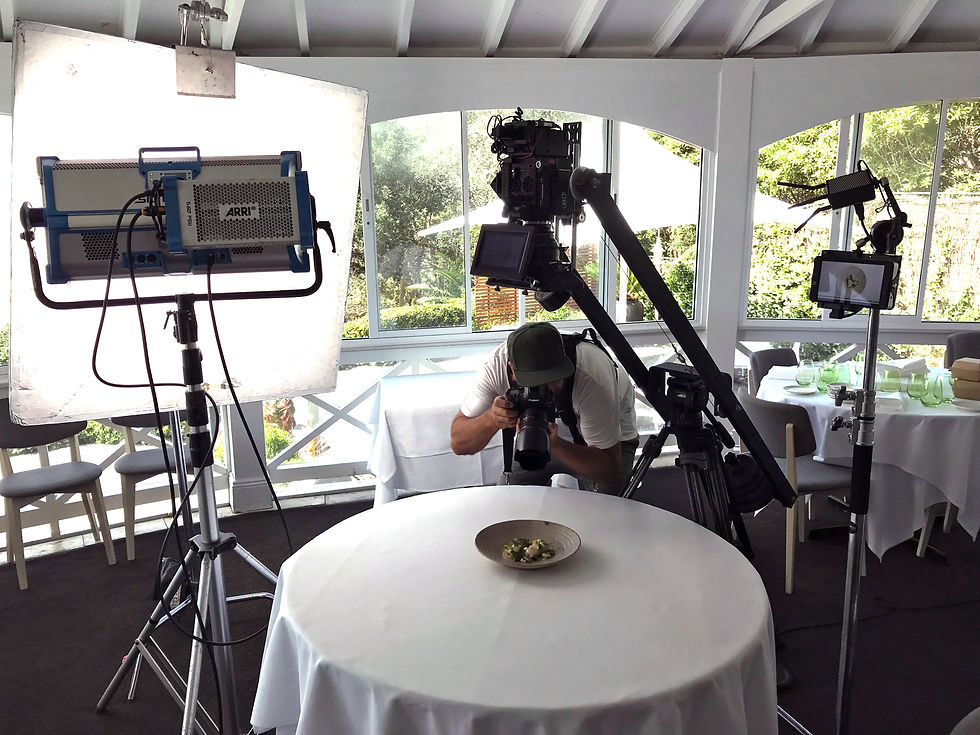
Here is the planning tip most teams miss: the best email thumbnails are shot deliberately, not pulled from a random frame of the edit. Freeze frames from moving footage are often soft, mid-blink or awkwardly composed. On our shoots, when we know a video will go into email campaigns, we capture dedicated stills on set, either with a photographer working alongside the video crew or by setting up specific hero frames with talent. It adds perhaps 20 to 30 minutes to a shoot day and gives you a library of thumbnails you can test.
Should You Use an Animated GIF Instead of a Static Image?
An animated GIF preview often outperforms a static thumbnail because movement draws the eye in a crowded inbox. The trade-off is file size and compatibility.
Keep these rules in mind:
Keep GIFs short, around 2 to 4 seconds of looping movement, and under about 1MB where possible so the email loads quickly on mobile
Make the first frame work on its own, because some versions of Outlook show only the first frame
Choose a moment with simple movement, such as a product rotating, a person turning to camera or a piece of animation resolving; complex camera moves turn into a stuttering mess at GIF frame rates
Animated content is especially well suited here. A 2D or 3D animation sequence can be designed with a clean, loopable moment specifically for email, which is far easier to control than live action footage.
How Long Should a Video Linked From an Email Be?
For most marketing emails, aim for 30 to 90 seconds. Someone who clicks from an email has given you a moment of curiosity, not a lunch break.
As a rough guide:
Product or feature announcements: 30 to 60 seconds
Customer testimonial or case study teasers: 45 to 90 seconds, with a link to the full case study video on the landing page
Brand or campaign stories: 60 to 120 seconds
Nurture sequence explainers: 60 to 90 seconds per topic, ideally as a series rather than one long video
If your hero brand video runs three minutes, that is fine for your website. For email, ask your production partner for a dedicated cutdown. Planning the cutdowns before the shoot costs very little; trying to carve them out of an edit that was never designed for them usually means compromises.
Which Types of Video Work Best in Email Campaigns?
The videos that perform best in email are the ones that match where the reader sits in their relationship with your brand. A cold prospect, an existing customer and a lapsed subscriber need very different things.
Welcome and onboarding sequences
A short brand video or a founder or leadership welcome sets the tone for new subscribers. Keep it warm and specific about what they will get from you.
Nurture and consideration emails
Explainer videos and testimonial videos do the heavy lifting here. An explainer answers "how does this work?", while a testimonial answers "does it work for people like me?". Both are ideal for B2B sequences where buyers need several touchpoints before talking to sales.
Product and campaign launches
A launch email with a short hero cutdown, or a teaser that links to the full campaign film, gives your announcement weight that a static banner rarely achieves.
Newsletters and re-engagement
Behind-the-scenes clips, short case study videos and product tips keep regular newsletters from becoming a wall of text, and a short, human video can win back subscribers who have stopped opening. Much of this can come from footage you already own.
What Does the Landing Page Need?
The landing page needs to play the video quickly, keep the reader focused and give them one clear next step. It is where the click from your email either turns into a lead or quietly disappears.
Check these basics:
The video sits above the fold and plays without the reader having to scroll or hunt for it
Captions are on by default or clearly available, since many people will watch with sound off at work or on public transport
The video is hosted on a reliable platform such as your website video player, Vimeo or Wistia, which also gives you viewing data
There is one primary call to action beneath or beside the video, matched to the email's purpose
The page loads fast on mobile, because more than 40% of emails are opened on phones
If you are sending a series of email videos as part of a nurture program, consider one landing page per video so you can track each step separately.
How Do You Measure Email Video Performance?
Measure the whole journey, not just the email. Click-through rate tells you whether the thumbnail and copy worked; video view data tells you whether the video held attention; conversions on the landing page tell you whether it actually moved people.
The metrics we suggest tracking:
Email click-through rate, compared with similar emails without video
Play rate on the landing page (how many visitors pressed play)
Average percentage watched and where people drop off
Landing page conversion rate for your chosen call to action
Downstream outcomes such as demo bookings, enquiries or sales influenced
If click-through is strong but play rate is low, the landing page is the problem. If play rate is strong but people drop off in the first 10 seconds, the opening of the video needs work. This kind of diagnosis is only possible if you track each stage.
What Should You Ask Your Production Partner For?
If email is part of your distribution plan, say so in the brief. It changes how a video is shot and edited, and the extra deliverables are usually inexpensive when planned up front.
A useful checklist for your brief:
Dedicated email cutdowns at 30, 60 and 90 seconds where relevant
Hero stills or thumbnail frames captured on set, ideally several options for A/B testing
A short loopable moment suitable for a GIF preview
Burnt-in or sidecar captions for every version
A strong first 5 seconds in each cutdown, since email viewers decide quickly whether to keep watching
Mobile-friendly framing, with key action and any on-screen text kept away from the edges
At Global Pictures, we plan these deliverables into brand video, testimonial, explainer and animation projects whenever a client tells us email is a key channel. It is far cheaper to capture an extra still on set than to recreate a moment later.
Bottom Line
Video in email works because it earns the click, not because it plays in the inbox. Gmail and Outlook will not play embedded video, so your results depend on a strong thumbnail or GIF, a fast and focused landing page, and a video cut to the right length for someone arriving from an email.
The most effective approach is to plan for email before the shoot: brief your production partner on email cutdowns, capture dedicated thumbnail stills on set, and track the full journey from click to conversion. Do that, and video becomes one of the most dependable ways to lift engagement across your welcome, nurture, launch and newsletter campaigns.
If you are planning a video project and want it to work hard in your email program as well as your website and social channels, talk to our Sydney team about building those deliverables into the brief from day one.


Comments